

Latest Update: Black Friday 2017: MacPaw Cleanmymac 30% Discount Offers
Update: Read our latest Macpaw’s Cleanmymac 3 Review and Download the Best Cleaner app for Mac that comes with tons of cool new features. Read some of the important highlights below.

Cleanmymac X
An All-In-One solution to keep your mac storage clean. Declutter, Remove Junk files, Optimise and Boost Performance.
- CleanMyMac 3 finds up to 54 GB of junk more than CleanMyMac 2.
- CleanMyMac 3 now reaches every corner of your Mac: Photos cache, old backups in iTunes, document versions in Sketch, Dropbox cache.
- CleanMyMac 3 is packed with maintenance tools to help you fix performance issues.
Macpaw CleanMyMac 2 software is not just a cleaning utility for your Macbook or iMac. It is more than that and one simple utility to boost your mac speed and performance. Macpaw has some interesting utilities in their store and cleanmymac is one such amazing tool that we are going to review here today. Gemini is one of their famous utility which is an intelligent software in finding duplicate files in your Mac. Cleaning duplicate files can save a lot of disk space many times, and Gemini does it really at best. Check out the full CleanMyMac 2 Video Review below.
Table of Contents
CleanMyMac 2 Review
CleanMyMac software has recently got a redesign and it is absolutely simple and best design ever. CleanMyMac 2 also got some new features to keep your mac clean and performance boosted always. You will love this amazing utility from the moment you opened after installing it in your Macbook or iMac.
CleanMyMac 2 Review
This simple utility for mac performs the cleaning in just one click. Well improved algorithm built in with CleanMyMac 2 just automate the things to clean and free up disk space from your hard drive or ssd. It will carefully select the files that are 100% safe to delete, and you can always review the files before deleting them from your storage drive.
Cache Files, Log Files, Temporary files, System Junk, Trashes and Leftovers can clog huge amount of storage space in your local hard drive. That is the reason you should install a software to clean them periodically. Whatever operating system you have on your computer, there is a need for cleaning utility to remove unwanted junk files which results in improved system fragmentation as well. You will notice quick application opening and processing when you keep your computer files organized.
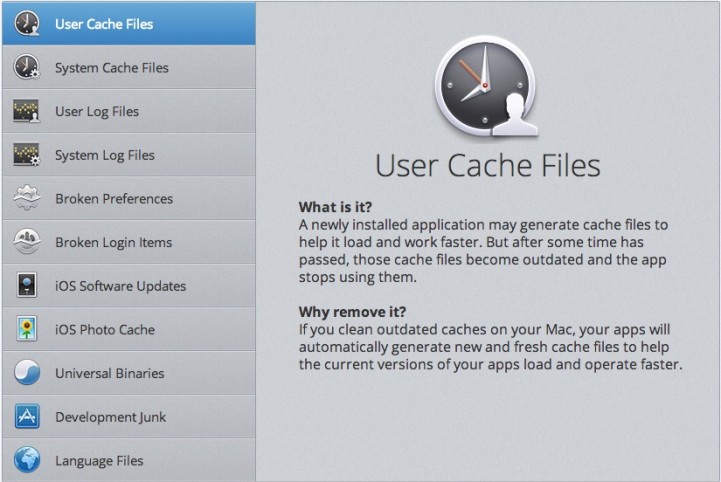
Find and Delete Old Large Files – CleanMyMac 2 filters can intelligently scan and detect old large files that you have on your system and didnt access for long time. Files such as .dmg, movie files and other unpacked archive files usually takes huge space and finding such files must be really hard for you without this type of automated utility.
Optimize iPhoto Library – iPhoto is one essential application and allows you to manage all your iOS Devices photos and albums in one place. You can take a backup of photos taken using your iPhone, iPod or iPad and edit them using iPhoto. You may apply filters, effects and make the photo look much better using iPhoto. But during these editing process, iPhoto hides the original files and that may take more storage space. Usually photos taken using iOS devices are quite huge in size due to high quality. CleanMyMac 2 can optimize your iPhoto library on Mac to reduce huge volume of storage space without harming your iPhoto collection.

CleanMyMac 2 currently supports this feature for iPhoto version 9 and above.
Manage Apps on Mac – Keep track of all your apps installed and uninstall any app completely without leaving any traces or temporary files which can occupy some storage space. If you are not using an app for long time and dont want it anymore on your computer, then CleanMyMac 2 can help you identify those apps from your collection and uninstall them completely. There will be no left overs which usually happens with regular uninstall process.
Review and Remove Extensions – CleanMyMac 2 displays all the plugins, widgets and extensions you have installed in your mac, and you can review them at one place. Safari Plugins, Growl extensions will no more slow your system performance. If you spot any unwanted extensions, then you may remove them to keep your mac clean and healthy.
Empty all Trash Folders – There are more trash folders on your mac than you think. One location to empty all trash folders and on your mac. Mac Trash cleaner is one powerful feature in CleanMyMac 2 to erase files completely on your system in one mouse click. This makes cleaning of your mac much easier and fun.
CleanMyMac 2 Scheduler – You can now schedule the cleaning process using the scheduler in CleanMyMac 2. You dont have to remember every week or month to clean up unwanted files from your mac anymore. It automates everything and helps you to experience the super fast macbook or imac always.
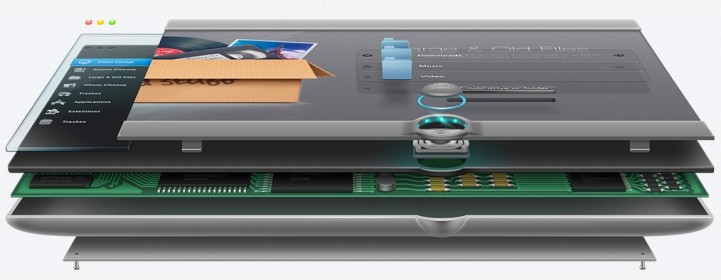
Drag and Drop Apps and Files – If you want to uninstall an app from applications folder, then simply drag and drop the app to Uninstall tab in CleanMyMac 2 to perform the complete uninstall without leaving any traces. Similarly, if you drag a file, folder or iPhoto library CleanMyMac 2 can suggest you the actions that you can perform and recommended to do.

Spensio Expense Tracker for iPhone
Track your Expenses, Subscriptions, Loans and EMIs all in One App. Try Spensio for iPhone Free today.
https://vimeo.com/60733176
You will love CleanMyMac 2 by Macpaw after your first time usage. Download a fully functional free cleanmymac 2 trial version now to see how powerful this application is in cleaning your Mac OS. If you find this as the best cleaner apps for mac os, dont forget to share your short review in the comment box below. It will be helpful for others who are searching for an app to keep their mac clean and performance rich.
Buy / Download
Price: 39.95$
CleanmyMac 2 to CleanmyMac 3 Discount Offer
You can get 50% Flat Discount when you upgrade your Cleanmymac 2 app to Cleanmymac 3. This upgrade offer brings big savings to you, if you are an existing customer of Macpaw Cleanmymac App.
(Click on the above image to take you to the 50% Cleanmymac Discount Offer page.)
CleanMyMac 2 currently requires OS X 10.7+ and takes 40MB space from your hard disk drive. If you like the trial version, you may consider purchasing this one for just 39.95$ to use all the features permanently on your Mac. Thanks for reading and have a wonderful day !




Very informative review in less no. of minutes. Keep up the good work! Have started using this app. Works really great and saves lots of space.
A good software to clean Mac files. And this software– iphone cleaner for Mac could helps us clean files from iOS system.