
Amazon coupons are easy to miss. Many shoppers pay full price without noticing a small coupon box near the price. This guide shows you how to find Amazon coupons, clip them, and stack them with other deals. You’ll also learn what to do when a coupon won’t apply.
Disclosure: This post contains affiliate links. If you buy through them, I may earn a small commission at no extra cost to you.
Table of Contents
Quick Answer: How Do Amazon Coupons Work?
- Amazon has a coupons page where you can browse and clip coupons for many products.
- Many product pages also show a coupon box near the price. Select it before you buy.
- The savings usually show up in your cart or at checkout, not in the listed price.
Affiliate link. As an Amazon Associate I earn from qualifying purchases.
Coupons and promotions can change or end at any time. Always check the details on Amazon before you buy.
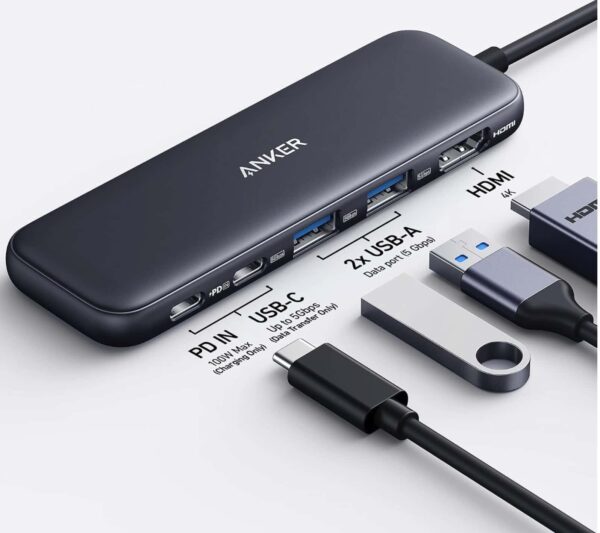
Anker 5 in 1 USB C Hub
85W Max PD, 1 Powered USB-C 5Gbps & 2 Powered USB-A 3.0 5Gbps Data Ports, for MacBook Pro, MacBook Air, Dell and More (Black)
What Are Amazon Coupons?
Amazon coupons are extra discounts that sellers and brands offer on certain products. You “clip” the coupon on Amazon, and the discount is applied when you check out. Amazon lists many of them in one place, so you can browse by category.
There are two common types.
| Type | How It Works | Where You Find It |
|---|---|---|
| Clip coupon | You select the coupon on Amazon. The discount applies at checkout. | Coupons page and product pages |
| Promo code | You type a code at checkout. Only some products offer these. | Product page or the offer details |
Amazon Coupon Categories
Coupons are grouped by category, so you can look through only what you need. Common ones include:
- Grocery
- Electronics
- Home and kitchen
- Beauty and personal care
- Pet supplies
Categories can change, so check the coupons page to see what’s live.
Do You Need Prime to Use Amazon Coupons?
Most clip coupons don’t need Prime. Some are marked as Prime-only, so read the coupon label before you count on the savings.
Where to Find Amazon Coupons
The fastest way is Amazon’s coupons page. You can also find coupons right on product pages and in the Amazon app.
Affiliate link. As an Amazon Associate I earn from qualifying purchases.
On the Amazon Coupons Page
Open “Today’s Deals” from the Amazon menu and look for the coupons option. Amazon changes its menus from time to time, so the link may move. If you can’t find it, use the button below.
Affiliate link. As an Amazon Associate I earn from qualifying purchases.
On Product Pages
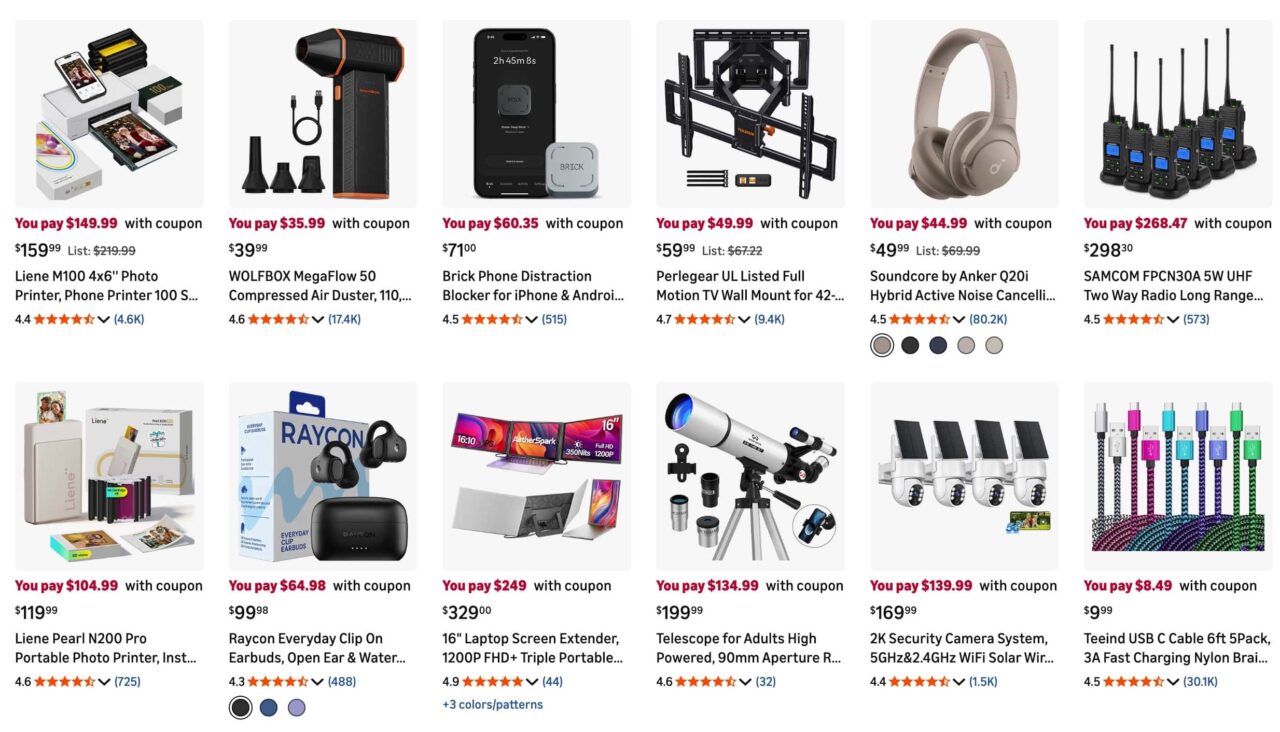
Many products show a small coupon box near the price. It may say a dollar amount or a percent off. If you see it, select it before you add the item to your cart.
In the Amazon App (iPhone and Android)
The coupon box also appears on product pages in the Amazon app. Open the product, check the area under the price, and select the coupon. The layout can look different between app versions.
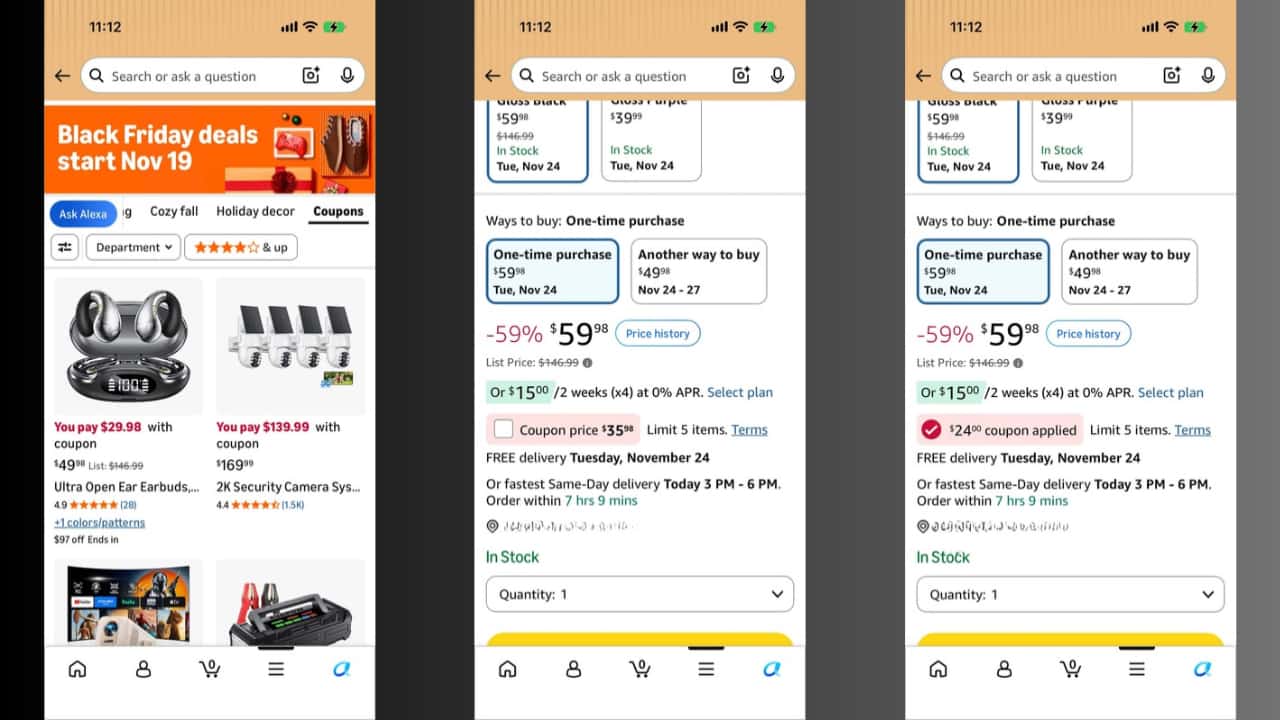
Are There “Hidden” Amazon Coupons?
Not really. The coupons aren’t secret. They’re just easy to miss because Amazon doesn’t always show them on the home page. Checking the coupons page and the area under the price covers most of them.
Affiliate link. As an Amazon Associate I earn from qualifying purchases.
How to Clip and Use Amazon Coupons
Clipping a coupon takes a few seconds. The steps are the same on the app and the website, though the wording can differ.
- Open the Amazon coupons page, or open a product page.
- Look for the coupon box or coupon label near the price.
- Select the coupon. On some pages it’s a checkbox, on others a “Clip” button.
- Add the item to your cart.
- Open your cart and check that the savings show up before you pay.
- Place your order.
Don’t skip step 5. If the savings don’t show, the coupon may not have applied. See the fixes below.
How to Stack Amazon Coupons
Stacking means using a coupon on top of a price that’s already lower. For example, an item on sale can also have a clip coupon. Rules differ by product, so always read the offer details.
Coupon Plus Sale Price
Coupons are often an extra discount on top of a sale price. The coupon savings usually show at checkout, not on the product page.
Coupon Plus Lightning Deal
Some items that are in a Lightning Deal also have a coupon. This isn’t guaranteed, so check the product page and your cart.
Subscribe & Save and Coupons
Some Subscribe & Save items show coupons, often for the first delivery. Read the subscription terms first, so you aren’t surprised by repeat deliveries. You can manage or cancel a subscription in your Amazon account.
When Stacking Doesn’t Work
Not every offer can be combined. A coupon may only apply to one item or one quantity. Some promotions don’t stack at all. The details are on the coupon or product page.
Amazon Coupons vs Today’s Deals vs Lightning Deals vs Outlet
These are different things, and people mix them up. Here’s a simple comparison.
| Offer | What It Is | Where to Find It | Good to Know |
|---|---|---|---|
| Coupons | Extra discount you clip on a product | Coupons page and product pages | Savings usually apply at checkout. Some coupons expire early. |
| Today’s Deals | Amazon’s page of current sales | Today’s Deals page | The price you see is already lowered. |
| Lightning Deals | Short-time deals in limited quantity | Today’s Deals page | They can sell out fast. |
| Outlet | Discounted overstock and clearance | Amazon Outlet page | Stock and brands change often. |
| Warehouse | Used and open-box items | Amazon’s used and open-box section | Read the item condition before you buy. |
Amazon Coupons for Black Friday and Cyber Monday 2026
Black Friday is on November 27, 2026, and Cyber Monday is on November 30. Amazon usually runs big sales around these dates, and coupons can show up alongside them. I can’t promise that coupons will be bigger or more common, so treat them as a bonus.
A few simple habits help:
- Check the coupons page more than once. New coupons can appear and old ones can end.
- Clip a coupon early if you plan to buy. Some run out of budget before they expire.
- Check your cart before you pay, since a deal price and a coupon are two different things.
- Don’t buy something only because it has a coupon. Make sure you need it.
Coupons and promotions can change or end at any time. Always check the details on Amazon before you buy.
Affiliate link. As an Amazon Associate I earn from qualifying purchases.
Shopping for Apple gear? See our guides to early Black Friday Apple deals on Amazon and Black Friday iPad deals.
Amazon Coupon Not Working? Quick Fixes
If your Amazon coupon won’t apply, one of these is usually the reason. Try them in order.
- The coupon expired or ran out. Coupons can end early. Check if the coupon box is still on the product page.
- You didn’t clip it. Go back to the product page and make sure the coupon is selected.
- You picked a different version. A coupon may only work for a certain size, color, or seller. Re-check the coupon details.
- It needs Prime. Some coupons are for Prime members only.
- Your cart changed. Quantity limits or other items can affect it. Remove and re-add the item.
- Another offer is blocking it. Some promotions can’t be combined.
- Refresh and retry. Close the app or refresh the page, then open your cart again.
If nothing works, contact Amazon customer service from your account.
Kevio: Family Medicine Tracker
No more missing of Medications, Tests and Doctor Appointments. Let Kevio keep a track of it, and Remind you right on time. Take Prescriptions, Blood Tests, Injections right on time with Kevio.
Are Amazon Coupons Safe? How to Spot Fake Promo Codes
Real Amazon coupons are clipped on Amazon’s own site or app. The risk comes from fake sites, emails, and messages that copy Amazon’s look. Scams often pop up during big sales like Prime Day and Black Friday.
Watch out for these signs:
- You’re asked to enter payment or login details on a site that isn’t Amazon.
- The email isn’t from an @amazon.com address.
- The offer promises something too good to be true, like a free gift card or huge discounts.
- You’re asked to pay or share personal details to “unlock” a coupon.
The safest habit is to open Amazon directly in your browser or app, not from an email or text link. If you get a suspicious message, report it to Amazon and the FTC.
Tips to Get More From Amazon Coupons
- Check the coupon before you buy, not after.
- Compare the final price with similar products. A coupon doesn’t always make the best deal.
- Read the coupon terms for limits on quantity or use.
- Check the return policy on the product page. Most items can be returned, but rules can differ.
- Look at seller and review quality, not just the discount.
Frequently Asked Questions
Do you have to be a Prime member to use Amazon coupons?
Not for most coupons. Some are marked as Prime-only, so check the label on the coupon.
Can I use an Amazon coupon more than once?
It depends on the coupon. Some have limits per account or per order. The coupon details on the product page will tell you.
How do I find hidden Amazon coupons?
They’re not really hidden. Check the Amazon coupons page, then look at the area under the price on product pages you’re interested in.
Why did my clipped coupon not apply at checkout?
Common reasons are an expired coupon, a different item version, a Prime-only offer, or a promotion that can’t be combined. See the quick fixes section above.
Do Amazon coupons expire?
Yes. Coupons have end dates, and some can end early if the offer runs out.
Are Amazon coupons the same as promo codes?
No. Clip coupons are selected on Amazon. Promo codes are typed in at checkout and are only offered on some products.
Final Verdict
Amazon coupons are a simple way to save a little extra, if you know where to look. Check the coupons page, look under the price on product pages, and confirm the savings in your cart before you pay. Be careful with fake codes, and remember that offers can change anytime.
If you plan to shop this Black Friday week, take a minute to check what’s available.
Start Browsing Today’s Amazon Coupons
Affiliate link: As an Amazon Associate I earn from qualifying purchases.
Found a coupon trick that works for you? Share it in the comments. Have a wonderful day.