
Perplexity offered free Pro subscriptions through several carrier promotional partnerships in some countries. Depending on the country, users may have received free access through a mobile network, Samsung device, payment service or another partner.
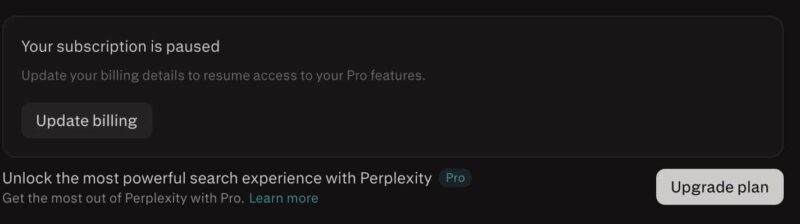
As these free promotional periods begin to expire, many users are seeing messages such as “Your Subscription is Paused.” Others are worried about automatic renewal and unexpected charges.
Here are answers to the most common questions:
Table of Contents
What Does Subscription Paused Mean in Perplexity?
Some users are seeing “Your Subscription is Paused” inside their Perplexity account and some are seeing Upgrade to Pro badge as the subscription already expired.
This usually means Perplexity requested a valid payment method, but the user did not add one within the given period. Pro features may become unavailable while the subscription remains paused.
Kevio: Family Medicine Tracker
No more missing of Medications, Tests and Doctor Appointments. Let Kevio keep a track of it, and Remind you right on time. Take Prescriptions, Blood Tests, Injections right on time with Kevio.
It does not necessarily mean that money has already been charged.
Open Perplexity on the web, go to your account settings and select Manage Subscription. You can check your current plan, payment method and renewal details from there.
Will Perplexity Charge After the Free Subscription Ends?
Many Perplexity promotions offered Pro access free for a limited period, such as six months or one year in some countries. They will not charge if you didn’t have valid payment details in your perplexity account.
If you have selected the options to auto renew, using the card information in your account auto renewal will be processed. Otherwise, you don’t have to worry about any charges on your card.
While claiming the perplexity offer, if you haven’t entered any card information, then nothing to worry about.
Just do a basic check following the tips below to make sure there is not auto renewal setup done earlier.
How to Cancel Perplexity Pro?
If you subscribed directly through the Perplexity website, sign in using the same account used to activate the promotion offer a year ago.
Go to Account, open the Subscription section and select Manage Subscription. You should see an option to cancel the plan or disable automatic renewal.
For subscriptions activated through Apple iPhone App, go to:
Android users can open:
You must cancel through the same platform used to start the subscription. This will prevent any subscription setup you have done using the appstore and playstore.
ProtonVPN Discount Coupon Code
ProtonVPN has Servers in 148+ Countries, Lightning fast Speeds, Ad Blocker, Secure Streaming, Double VPN and more.
Will Perplexity Pro Stop Immediately?
No. You will be able to use the benefits of Pro subscription till the subscription end date. You won’t be charged when the renewal date comes up, if you followed above steps to cancel your subscription.
Check the confirmation message carefully. Confirm the date of cancellation as a verification.
After cancelling, take a screenshot of the confirmation page or save the cancellation email. This can be helpful if you notice any billing issues later. You may contact perplexity customer support only if required.
If you find this information useful, share it with your friends. Have a wonderful day.