

Update: This technique allows you to download pdf files from scribd.com less than 30 pages only ! If you are looking for PDF Password Remover tool, then check out iSkysoft PDF Editor for Windows and Mac which removes PDF Password Protection easily.
Scribd is a PDF hosting service where user can upload their PDF documents and share it with his or her friends by simply sharing an URL. This brings a great relief for PDF users where the quick sending of pdf documents compare to doc (msword) files was tough earlier. Scribd brought another service as iPaper which raises the talks and questions in internet among users as “Is iPaper a PDF Killer ?“.
Parallels Desktop for Mac
Run Windows inside macOS seamlessly with Drag and Drop file transfers between Windows and Mac. Windows Apps and Games runs on Parallels smoothly. Save with your Purchase today.
Lets keep all those talks away. Here i am going to guide you step by step to download a Protected PDF file from scribd website. The process requires simple PDF Creator tool which can be installed as a plugin with the Microsoft Office and helps to covert word documents to pdf in 3 simple steps.
Step 1: Download and install any PDF Creator
I assume that you have MS Office (compatible or latest version) installed in your system already. Now, download PDF Creator which ofcourse available for free in internet. Here some commonly used PDF Creators (PrimoPDF , PDF Creator , doPDF and many more…). Do remember, that Google is your best friend. doPDF is one of my favorite.
Step 2: Open the Scribd Document which is protected and download or “save option” not enabled
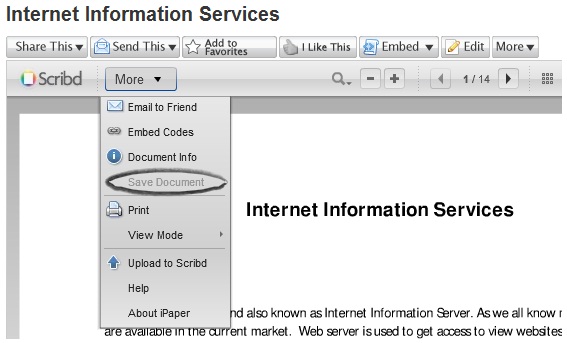
As shown in the above screen shot, now open the document which has no “Save Document” option enabled. Now select “Print” which is next to that. Remember, you must select print only after confirming that the full document loaded on the scribd ipaper page. Else there is a possibility of getting last few pages blank in your document.
Step 3: Now, select print and click ok to proceed saving the document in your local hard drive
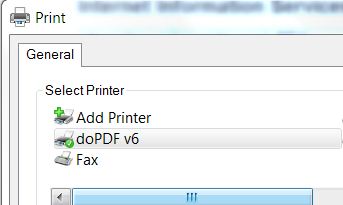
We use the PDF Creators to convert any .doc, .docx format files to .pdf . Here i am converting it using doPDF tool and the above screen cap shows that. If you are using Mac OS X then do check PDF Creator and Editor Mac OS.
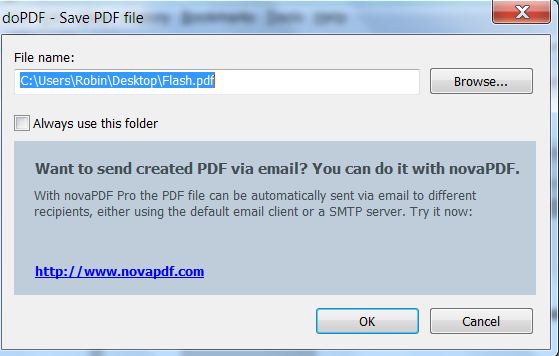
When it prompts to save the document, you may locate the desired path. However the file name should be as it is. Changing in file name result in blank document many times. Once the document download completed you may change the document name as you wish. In 3 simple steps you have your document downloaded to read at your convenience. Happy Reading… 😉
Cleanmymac X
An All-In-One solution to keep your mac storage clean. Declutter, Remove Junk files, Optimise and Boost Performance.
Readers update:
Best option will be install Internet Download Manager. After installing just right click on the page you want to download and select “Download with IDM”. It works even for protected files..Hope this helps…
– Alex Mathew
You may also like to Read:
Thanks for reading my article !
Thanks for reading and do subscribe to our Feeds for more tech updates and news. You may share this post in Facebook and Twitter to let your friends know about it this trick.


Nice Guide .. Waiting for this .. Thanks
this post is kinda useful for most f them who donno how to dll pdf …. this jz makes us clear abt it .. thanks to this post
😉
more tutorials please
Thanks, very much.
You are welcome 🙂
Don't work, because from 84 pages, can download with PDF printer only 20-21 pages.
What can I do to download all pages?
For example, this document – http://www.scribd.com/doc/11715679/Inteligenta-…
Thank you!
I tested and it will work. Just scroll down all the 84 pages before proceeding for printing. And please do reply here whether it works for you or not..
Don't work!
Even if I scroll to the end (page 84), in View Mode List, I print pdf 84
blank pages, and in View Mode Book, I print pages with content, but few
(varies from one trial to another – 11, 13 pages).
I tried several pdf printer – CutePDF, PDFCreator, PrimoPDF. The result
is the same.
Just tested with the document you provided iulianbosoi, and found that i am able to print only 29 pages. so it varies between users and i modified the post in the starting itself with a clear “note”, saying that we can download only pages less than 30 from a document.
I will try figuring out the actual problem and will bring alternative to download the full document soon.
Thanks for your patience !
The method is not functional in all cases, especially when there are more pages in a book.It downloads only few pages, from book with >100 pages.
I think someone must creates some utility doing this.
Just now, I'm looking for this utility if someone made it.
It's a waste of time with printing driver pdf method.
Thank you very much. This idea is being used for a noble cause.
Arvind
India
What if the print option is also blocked like my case :S
Hi guys,
I was fighting this problem re: downloading iPapers in full from scribd.com. (Some guys upload their documents to scribd in this format and then sell the .pdf version for greens (money always talks 🙂 ).
On one site, I found a solution, which is not perfect but at least you can get the full content of the document with no formatting (only text). Here is the link (I tried it, it did work):
http://209.85.135.132/search?q=cache:1jo8nrtoVJ…
The lookout of the downloaded document is far from being perfect, but at least you have the content.
Regarding the “download limit” using a virtual pdf printer, I managed to print/ download 80+ pages (not the entire document, unfortunately) using the following method:
virtual printer: PDF Creator
In the settings panel, set 2 pages per sheet. Then print the document.
BR,
Gabor
Thanks for the update @gabor, the technique you suggested works well with the text document. I tried copying similar document too.
– Robin
Hi every one,
I became a maniac regarding the magic iPapers put up on scribd. I did a little bit of searching and achieved some promising results.
1. The whole thing of not being able to download longer docs is somehow caused by the fact that “script timeout”, the meaning of which I have no idea, is set to 60 secs. As soon as this is over, the download process stopped.
2. In scribd, if you change to view mode “book”, and you set the number of pages per sheet to 2 (which is still manageable, I guess) in PDF Creater, I managed to download a doc of 144 pages (an entire document)
cheers, Gabor
I tried the above, the PDF created but the document is not visible. Only blank PDF file created…
Kindly guide.
Thanks in anticipation
That is not possible.. better try again with the same steps guided to not getting a blank document.
– Robin
Now, the print functionality is disabled! Are there other solutions? If i just click print, only the first page is displayed!
What to do if both download and print options are disabled?
I think they just changed the features! …so, no more printing!! 🙁
Best option will be install Internet Download Manager. After installing just right click on the page you want to download and select “Download with IDM”. It works even for protected files..Hope this helps…
You realize, I hope there were much more weblogs like this one, I really enjoy this content published here
best solution i have ever seen.you have solved my problem.thanks very much.
thanks a lot.
how to do if scribd website is bunned.
thnx … its realy help me.
i was able to download a file on sribd through primopdf but when i opened it the paragraphs were composed of unknown symbols… =(
i cant download full document.. wat to do?
Very cool. Thanks for the info.
use this site for downloading from scribd http://scribddl.tk/
tnx a lot! thumbs up!
thank you soo much
Worked great! Tks alot.
its not working
anymore.
what are you to say incredible. I’ve been practicing. Now I am easy to get a pdf file from Scribd. thank you
how to extract a file from scribd which does not have both download and print option. Pleese help
??? How to copy/download ppt Power Point presentations……?
HELL YA! Thank you @f0c90673edfca10551ff5ac1f439376c:disqus
Thanks lots Brooqe! His link worked divinely!!
Thank you for share, ManuelaPaja
nice site yaar…it really works
that’s an awesome trick..
thanks a lot !!
is there any trick to D-Load for the new version of scribe plz guide us if there is any
Hi guys no need to install and login this site as of my exp…
U can simply upload any unnecessary doc and immidately u will get a chance to download the specific file.. Dont waste the time to install the unnessary softwares.
Please Give me just new trick. all above are not working i have tried all
Please Give me just new trick. all above are not working i have tried all
you are the greatest king ever thank you man you are awesome thanks ( internet king ) god bless you
only 2 pages saved…..pitty…did not work for me!