

 Hi friends..!!! hope you all had a great week and now the topic is for those try to switch from windows to lucid lynx (Ubuntu 10.04) where they might feel this problem. Yes, in Lucid Lynx the close, minimize, maximize buttons appears in the left side by default after you upgraded or newly installed ubuntu 10.04. Generally Mac OS users are pretty much familiar with this type of window control method and access. But for windows users and ubuntu users its bit new and many times feel different while closing or maximizing the window. Here, i have listed few simple steps to bring your window controls back to the right side.

Parallels Desktop for Mac
Run Windows inside macOS seamlessly with Drag and Drop file transfers between Windows and Mac. Windows Apps and Games runs on Parallels smoothly. Save with your Purchase today.
Step 1: Press ‘alt+f2′ keys to open run window.
Step 2: In run window type ‘gconf-editor’ and then click run to open configuration editor window.
Step 3: Explore ‘apps > metacity > general’
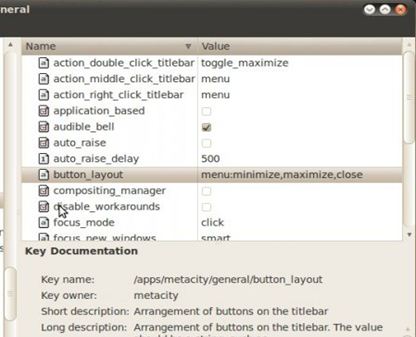
Step 4: Select button-layout on the right-pane double click on the ‘close,minimize,maximize:’ on it’s right side and edit it as ‘menu:minimize,maximize,close’. Now the buttons should be reached on the right side.



Hearing lucid linux for first time eager to use it after reading it bcz windows is not upto mark when compared with linux hope i guess its better to use it as soon…..
Thanks for your support arpith!!!
i planned 2 switch linux..
but i’m in need f pushback..
ths article does helps me
No problem in switching to linux… always there to support you guys.. Thanks for commenting.
As a new Ubuntu user, I am sure this article will help me. Expecting such useful stuffs in the future also. Thanks!
Sure JK, will be supporting you all the time in future posts!!! Cheers!!!
The easy way to make a directly change in seconds….
Open the terminal window from the Ubuntu 10.04 desktop by selecting Applications — Accessories — Terminal from the main menu.
Next enter this command into the terminal window.
( gconftool -s /apps/metacity/general/button_layout -t string menu:minimize,maximize,close )
This was of great help…
Also is it possible to change transparency of windows, their workspace background etc through gconf?