

People always like redecorating their home than just living with same boring colors and items. Yesterday many users have got facebook news ticker which is currently under testing by Facebook and expected to be launched soon. Today many facebook users got new features enabled to their status update area. Faceboook today brings control privacy, location adding and tagging friends feature (more user friendly). Lets check out the cool facebook new features 2011.

Apple iPhone 17e - 256GB
iPhone 17e features 6.1 inch Retina Display, 256GB Storage, Ceramic Shield 2 with 3X better scratch Resistant. Magsafe Wireless Charging and A19 Chip powers this beautiful device.
Affiliate link. As an Amazon Associate I earn from qualifying purchases.
Table of Contents
Facebook Control Privacy when you Post or After
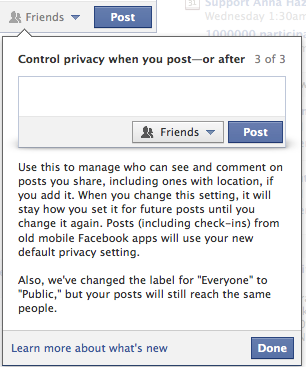
Now control your Facebook wall status update even better. The previous privacy feature for each post you update on wall is now much better with this simple interface. Simply click on the Friends pull down box and choose who you want this post to be visible and invisible.
Facebook New Friend Tagging
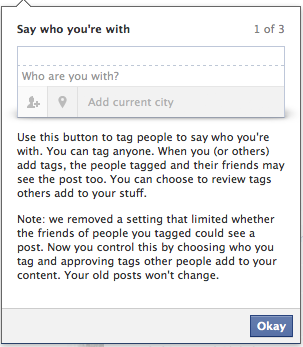
You can tag your friends easily with the new space “who are you with ?” feature. It looks even better than the previous tagging feature that facebook had.
Facebook Add Location to Posts
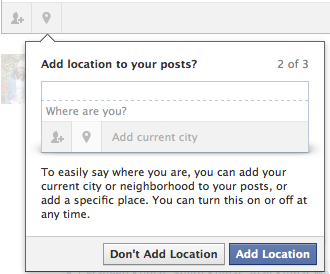 Finally, facebook location feature added with the posts which you can mention you exact location while updating your facebook wall. This feature was there with mobile version and now facebook has brought this to tablets and computers as well.
Facebook also brings some changes to albums and image. Now, the photos you share on Facebook are bigger (720 pixels to 960 pixels) and load twice as fast, giving you quicker access to more detailed images. Photos you’ve already uploaded to your profile will also be displayed at this higher resolution.
Thanks for reading and please do share this article with your friends and followers in Facebook, Twitter, and Google+.



Just got this news, like it.
But they didn’t improved their security setting option ( quite harassing ) 🙁
Would love a video tut for this one
but facebook privacy isn’t easy as google plus… +1 google for circles.
+1 fa G+….. 🙂