
If your facebook account suspended due to friend requests you have sent from your account by ignoring the warnings issued, then send an email to disabled@facebook.com to reactivate facebook account. This may take 5 days or little more to get your account back. Explain the exact action you have performed which made the account go blocked.
Facebook has introduced Trusted Contacts feature recently; learn how to recover Facebook account using trusted contacts here.
I got this message for second time with my facebook account. I was not sure whether the problem caused due to firefox or because of any phishing site. I was getting this error while trying through firefox. Anyhow, Facebook proves the stealthy security system in place 🙂 that makes me bit comfort. It takes me through 4 steps to activate my locked account.
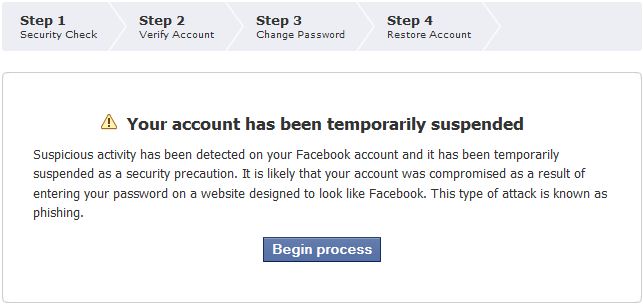
Verifying the Date of Birth, Primary email address configured and finally an email will be dispatched with the link to enter your new password. That is all it takes. This automatic locking system is effective but will scare any one bit at the first shot. It is also advisable to check with your primary email address to change its password from the older one.
If it is Gmail, check for any recent unknown IP logins through the footer of your Gmail account page. The IP details will reveal whether any other person has logged into your account or not. These must be done in no time. Delaying may let the hacker take control of your email address too.
Also Read, iPhone Lock Screen Wallpapers | Peacock and Flowers Theme
For more Software Deals and Discount Coupons, visit our DailyTUT Coupons section. Have a wonderful day.
You may also like to Read,




Even I faced this two times earlier, it too annoying, the most frustrating part is we can't put the used password again.
Yes @himanshu.. even though we had it secure one 🙂 We made to remember lot of passes by FB 🙂
I have never experience it man! But i need to be cautious.. Thanks for letting us know about this..
Thanks for your comment @Tech-Freak, and you are welcome 🙂
My account has been suspended I can’t get in contact with facebook so they can help me with this problem what can i do? Everytime i try to go in it keeps telling me that y facebook has been temporarily suspended what can i do!!!!!!!!1
We have the same problem 🙁
me too
me tooo
Yous Do Things about it try to fill out different forms and sites mine is locked and am trying so many things just to get my account back……. Try this http://watchdog.truste.com/pvr.php?page=complaint&ur. Hope it will help but am still waiting for their answer and it says it will take up to 10 business days but it might be longer or shorter okay….. 🙂
me too. If you find any solution please mail me azpeter@@hotmail:disqus .com
same problm with me… what u do to solve its
Hello to whom it may concern:
I thought I post this here. Sorry if it sounds out of place with your reply. I recently found out that my account was suspended for visual reasons.
1. I have no idea what bot software you are talking about, 2. I have
no sight to begin with, 3. I am tired of being asked to give
information that I do not feel safe giving out, 4. Please do not ask
me to call the authorities on folks who unfortunately have more power
than you. If I do that you not have a career or bank account. So could
you please stop suspending my account or I will file a lawsuit that
may have repercussions on so many levels and walks of life.
So far… Still don't need this yet. Hopefully, won't need it. 😛
Thanks for your comment @jayce, This may happen unexpectedly to any fb user. And the security done at FB end also pretty cool. 🙂
I got this message last Sunday and am trying to go through the steps to unlock my account. Only problem is the security code Facebook is supposed to send me never comes through to my email. Has anyone had this problem? If so, what have you done?? I've tried emailing various Facebook addresses and haven't gotten any answers!
Hi Rachel,
Facebook support system is the one that never responds.. 🙂 similarly the facebook phone confirmation link. The phone system wont work fine with all the mobile service providers to receive the confirmation code. The one thing we can do is trying alternative mobile service providers within our region.
And for Email delivery, sorry to say you have to wait… The FB Email Delivery system is fast usually with its applications and other reminders but not with this account related things.
I am having the exact same issue as you. The security code never comes to my email. Have you gotten yours yet?? I have tried emailing several “customer service” addresses at Facebook and have gotten no help.
Hi, this problem usually occurs if you are using Google Apps configured email.
Try the same with any other email service providers like yahoo, rediff or gmail.
Oh my gosh the exact same thing has happened to me and I am so bloody frustrated with it. I have a hotmail account and but like the gmail users you mentioned no confirmation code ever comes through. I disabled cookies, emailed the fb help people AND tried changing my password multiple times but nothing has helped… :'(
scratch that! I finally managed to fix it: some fb addresses are blocked in hotmail (I’d say this goes for other email accounts too). Sure enough the one i needed was in the blocked section in my settings. After unblocking I was able to complete the account recovery process 😀
Heyy india.. please tell me how can i do this..Im facing the same problem :S
please tell me step by step !!
your help is highly appreciated !
PLEASE HELP IM DEALING WITH THE SAME PROBBLEM I HAVNT BEEN ON FACEBOOK IN OVER 6 MONTHS, I TRY FIX IT EVERYDAY BUT IT DOSN’T WORK….
India i could really use your help! i have gone weeks without facebook! pleaze help me! (:
i have this problem at the moment but when it asks me for the code i type it in and submit it.
it just asks me for it again and again and again. how can i fix it????
I got a similar problem. They texted me the code. However, I can’t type it (or anything else into the field provided in step 2). I’m stuck, any help is much appreciated.
@michael1988 I am having the same issue today. I type in the code and it keeps asking for it again and again. I have tried to enter it on Safari and Firefox… nothing! Any luck yet?
Hi @michael1988 and @kimity, the issue may be with the Re-Captcha identification. Please try refreshing the captcha alone to finish this step.
I tried the same and it worked.. few captchas are actually not readable.. Thats why..
– Robin
Thanks for the response, Robin. I tried it but no go. I guess I will just have to wait to see if I get a response from facebook. I just wish they would just take the page down altogether. If I can't access it, I don't want anyone else to either. Thanks, again for the quick response.
hy. I’m getting this message but on step 3 (I have 7 steps) I need to verify my account with security code whic isn’t coiming in e-mail on my e-mail address. I have contac them to e-mail but aren’t responing. can anybody help me??? thank you
I have the same issue, this is the second time that happen to me, but I’m so annoyed because I can’t remember the birth date I filled, I put there any date (I didn’t think it would be important to recover my account ) , so I can’t fill well the confirmation of my birthday, then I can’t activate my account. anybody can help me?, I tried changing my password, it worked but my account is still suspended and appear the same message, I’m not sure if the facebook’s help center could help me, the first time that I ask them for help, they never answered to me.
thanks
NEW
PD: please, any help email to me tyno2002@hotmail.com
report it here: http://www.facebook.com/help/contact.php?show_form=safety_process &here: http://www.facebook.com/help/?search=suspended#!/help/contact.php?show_form=validation_error
go on this forum: http://www.thefacebookforum.net/forum.htm and ask for help. and also comment here: http://blog.facebook.com/blog.php?post=107720572130 (it’s official Facebookblog, but I don’t think they are reading comments 🙁 )
Same problem as above nothing seems to work!!!
I have the same problem as michael1988. Unlike the picture above, there are 5 steps. The 3rd step is to Send Code, which in my case is supposed to go to my email address. It says it sends the code (and shows my email address) but it never is received in my inbox, nor is it in my junk email, nor is it bounced. I have no idea where it is going.
Because my account is suspended, and because I can’t create another account using my only email address, I can’t even ask a question on Facebook about this. (What a f’d up support system they have — could it possibly BE any worse?)
Are you using google apps type of email services ?
Robin, excuse my computer ignorance but can you explain what you mean by using google apps type of email services?
Google apps provides free email service for domain owners. You can check that out at http://google.com/a/ A domain owner (example.com) can register for an account and route all their incoming and outgoing mails to the google mail server.
https://www.dailytut.com/technology/how-to-setup-google-apps-for-your-domain.html
i have same problem with that security code , i am not receiving a mail with that security code , can some1 help us ?
I have same problem , i am not getting email with security code , but my email is good and i get facebook mails when i reset password , i must get that mail with security code , help pls …
I am having exactly the same problem as everyone else, I need step three of the verification code sending to me and it does not send to my email atall. I’m not great with the computers so any major technical steps prove to be difficult i just need something in plain english.
I am so upset and fustrated and facebook are useless at getting back to me i’ve contacted them on several occasions regarding this matter and nothing. I can’t believe that so many people are having this same issue and they haven’t sorted it out. I wouldn’t mind but it wasn’t my fault that it was hacked so now that i’m trying to recover it, it doesn’t work! I have friends and loved ones i depseratly want to get in touch with 🙁
Hello Dee, So sorry to hear that. who is your email service provider ? yahoo, gmail ???
I’ve got yahoo, and the same problem. I’ve unblocked every Facebook-related address, and still nothing. Nothing in my spam filter, either. Argh! Has anyone gotten past this?
My account has also been suspended, for what reason I do not know. I get the same way of unlocking my account and I get to step 3 where they are suposed to send you a security code via email, however I haven’t recieved that email. What should I do?
Many people have this issue at around the same time? I got this too and its annoying me, i dont get any e-mail sent to me telling me my security code, I too have family and friends on this account that i’d really love to get back to talking to. “It says Your account has been temporarily suspended Suspicious activity has been detected on your Facebook account and it has been temporarily suspended as a security precaution. It is likely that your account was compromised as a result of entering your password on a website designed to look like Facebook. This type of attack is known as phishing.”
The steps are a bit different and they say this at the top “Step 1
OverviewStep 2
Security CheckStep 3
Verify AccountStep 4
Change PasswordStep 5
Email PasswordStep 6
Review ActivityStep 7
Restore Account”
And just like all of you, I get stuck at the point where they request a security which they will “send” to your e-mail. Anyone else here pissed and impatient or is it just me?
yes mee ! -.- i cant get past step 2 because it wont let me answer the questions !!!!! D: STUPID SHITTT ! THIS IS MY SECOND DAY WITHOUT USING FACEBOOK ! SCRET IT.
I am another one who does not receive the code..so I can progress to step 3!!!!! What are we to do??
Why are there so many of us like this???
I am really ticked off
im having the same exact problem cant get passed that step it wont send me the code via email..what do we do….
Same problem here , no code no response, has been 3 weeks and I have spent a lot of money on their games:(
I am having the same problem. My Facebook account has been phished, and temporarily suspended by Facebook. In order to regain access over it, I have to go through 7 steps. Everything is fine with steps 1 and 2, but I get stuck while completing the step 3. It simply won’t send confirmation code to my email. I even tried completing the 7 steps from another pc, another browser, I have cleared my captcha, but nothing.
Can anyone please help me?
hey guys i seem to be having the same problems as all of you…it’s a joke., there seems to be no way for us to contact facebook either for advice or just them to sort out the damn problem and let us access our OWN account!
It’s step 3 which is annoying – I keep attempting to send the confirmation code to my email, but nothing. And I can’t get past this step!
Any help would be appreciated muchly!
HI….
Unfortunately I recieve that message every time I try to log in the past 3 days :((( I try to follow the steps but they never send me the security code for step 2 to my e-mail adress in order to proceed.Im devasteted….Ive send an email about this problem to facebook team but I didnt get any reply….Can you help me??
Thanx in advance:))
Im having the problem that my account is temporarily suspended but once i press start to go to step 2 it doesn’t even let me answer the questions.
I am having the same issue. When I answer the questions about who is tagged in the photos it sometimes lets me answer, but sometimes just flashes the picture and then goes to the screen that says that my answers aren’t accurate enough. When it does let me answer, I know that I am answering correctly.
I have received the same email and also did not receive the security code in step 2. I have sent several email with no response and I am still trying to activate my account it has been 2 weeks. Did you eventually get your account back??? If anyone can help me to rectify this problem I would appreciate it.
Add me in gtalk blog@dailytut.com. let me see whether i can help you in any means.
it happened to me today…how will i restore my account i tried to fill it up but i need to wait for one hour before doing it again i’m afraid they might already hacked my account please help me…
hey i got a temporary suspended account..how long does it last?
i got the same problem but my facebook is still suspended …. how long will the suspension last or ? please reply back on my email … lippyxstar1@hotmail.co.uk
We are not sure about the timing but try contacting facebook support. I know its one of the worst support experience that people have when they call or send mails.
Just give a try and thats the only hope. Otherwise you must create new facebook account and never add the people who you dont know much. The facebook warning message should not be ignored while adding 10 or more people in a day.
i am also having this problem except it sends me the security code, but the next step(whixh is changing your password) is the farthest it’ll let me go. i change my password and thats it:(
anyone else where im at atleast?
I am having the same problem. My Facebook account has been phished, and temporarily suspended by Facebook. In order to regain access over it, I have to go through 7 steps. Everything is fine with steps 1 and 2, but I get stuck while completing the step 3. It simply won’t send confirmation code to my email. I even tried completing the 7 steps from another pc, another browser, I have cleared my captcha, but nothing.
Can anyone please help me…wer can i get the security code…
My lucynickel@hotmail.com account was temporarily suspended due to improperly entering an incorrect password too many times before realizing it when it was too late.
I have gone through the steps that is takes in recovering my account. It takes me to step 3 where I am able to change my password, but then it stops there. I cannot go to step 4. Is this a glitch of some sort? Any help would be greatfully appreciated.
Thank-you for your help,
Lucy Fischetti Nickel
lucynickel@hotmail.com
my facebook account has been suspended and im upset about how useless facebook are being about it !!!
my facebook is teporary suspended and its been like that for about 2 weeks now and i did change my password to a new one now im waiting for it to be fix. how long dose it take so i can use my facebook again and has this happen to anyone before that got there facebook working again ?
hi. i have changed my pass but since 2weeks i cant enter in my profile.. now, can u use ur profile or did u make another one?
Mine wont send me a message its so frustrating 🙁
Please try sending an email to blocked@facebook.com with a detail on explaining your side about how the account actually got blocked, and request for unbanning. Some of my friends found this useful and got their account back. So give a try people.
Guys, so sorry. Please send mail to disabled@facebook.com and its not blocked@facebook.com. Send an email with an explanation to reactivate your account and i believe it may happen in 5 days time.
Same here,my account has been hacked,now temporarily suspended,
when trying to do “the steps” ,i can’t answer the security question,cause i don’t know,i never change the security question before,maybe the hacker already changed it,what i can do only change password,i can’t restore,help,thanks
same thing
i enter the code and they keep askin for it
I ave tee same problem and im still not recievin te confirmation email wit te code i need to enter in order to o to te next step, i ave emailed tem plenty of times wats oin on??????
I HATE FACEBOOK NOW….I HAVE TO MAKE A NEW ACCOUNT RELOAD MY PICTURES MAKE NEW FRIENDS SERIOUSLY HOW AM I SUPPOSE TO THE ORIGINAL FACEBOOK FROM A COPY IF PEOPLE WOULD HAVE TOLD US ABOUT THIS BEFORE WE WOULDNT BE IN THIS SITUATION FACEBOOK REALLY? STEP YOUR GAME UP!!!
me have the same problem, they didn’t send me the security code for step 3. help anyone help~! it’s irritating…
i have got this resolved for my account … the facebook mail with the ‘security code’ was moving in to the ‘spam’ folder in my gmail account.
i was not seeing the ‘spam’ folder in gmail since i had selected ‘hide’ option in ‘account settings’ of gmail …
SO please check if your spam folder and bin folder …you will have the email from facebook in there … i have been able to restore my account … thank you all …
Same problem as the above – the email is not in the spam folder though! anyone come up with a solution?
Thanks God. this never happened to me.
I bookmark this post for future use, who knows it happens to me one day ahaha.
PS. what plugin do you use, so if i clicked the image, it says error thing? is it a plugin or a .ht access code?
Thanks.
So I had the same thing but instead of saying ‘begin progress’ it said ‘Continue’ & When i clicked on it, it made me type in security check nothing to do with my d.o.b or anything & After that it just said your account has been ‘temporaily suspended’
Its So Frustrating its the first time its happened :/
Facker GM’give Back My FACEBOOK……I can’t fight The Gema or Facebook ……………
hey my account has being teporarily locked and i cant complete the steps to verify my account…my account was suspended because i forgot my password and i kept trying to log in but now i have a new password but my account has being locked please help me.. my account being like this for 5 days allready i really dont know how to solve this problem
hi my account has being locked for 5 days allready and when i try to comfirm my identity i cant because i dont get passed step 2 which says Your Account is Locked Temporarily.
In order to regain access to your account, please contact our User Operations team..please help me
der sir ,
i am rabindra parajuli , i would like to request my face book has logging by some one please help me . i forget my security code that why how can i loge on my face book plese help me .
rabin
what if you cant get passed step one ?? it wont let me what do i do ??
i had same proble mine facebook.. sigh…
I always keep thinking that why they have added this feature if they don’t wanna allow us to send request to our freidns in bulk . I recently added my gmail id and invited all my friends but after few second I got a message that your account has been disable for 2 days and you can not post anything or send any friend request .
.facebook pLz. work now ..I need my Facebook
Thanks for sharing the information
my facebook account has been temporarily suspended plz tell me what can i do
I experienced this when I accessed my FB account using proxy. Thanks God, I accessed my account again.
Great tute….Till now I haven’t experienced this kind of problem with fb but this tute will be useful in future
can anyone please help my facebook account was suspended and i don’t know what to and i keep trying to do the following steps it won’t work specially step 1….. please i really need a help!!!:((( and i’m so very upset!!!!!
why can>t someone help me unlock my account. i”ve tried everything with no luck HELP HELP HELP
My account has been suspended for sending request to unknown persons and its already around week i am not able to access it .
My account has also been locked for temporarily for four days but after days it is unlocked by Facebook automatically and it happened due to sending friend request to unknown people. so dont do this because i also dont like friend requests by unknow people.
hi,,guy’s im’ lord_jayron my facebook account has been temporarily suspended i did those instruction,but its nothing happened how could i restore my account,my brother is getting sending me important message but i can’t read view my account anymore,in asking your BIIIIIIIIIG,,,HELP..THANKS AND GOD BLESS YOU ALL..
hi i’m prajwol my fb is temporarily blocked since last tuesday night.i cant login in my account any more.i get sayin phone not listed open from recognized computer and all. now how do i reopen my fb account????help me if any one can plz
MY face book account temporaily locked.
is someone hacked my facebook account.
i dont know but definitly there is no security in facebook.
I have a problem with my face book its being temporarlysuspended . please help me to cum out of it…
Hey , My account is compromised i didn’t know how and why and it was locked temporarily , and there is some steps first one to visit facebook team , I need someone to do these steps please help me and i will give u my email and password
God you got your account suspended? I’m scared hope it will definitely not happens to me. btw Thanks for the steps!
i have gone in another country
my account on facebook says i am suspended what to do i need help
my facebook account has been suspended
my facebook account has been suspended
i cant login my fb account plz help me /.//////////
tell me my acc. is hacked and my yahoo too and i forgot the answer 2 my security question and i dont have access to my phone already?(sigh)what 2 do?
Hi, I have got a problem, When i login there is problem to logging
Log in from a recognized computer
i don’t know what is this help me plz.
Log in from a recognized computer, I don’t know what is this help me my account is not working.
I really need help..please…i lost my mobile and when i log in to fb it will verify my account thru my mobile number thru sending a verification code to my number, i could not anymore since i lost my phone. I dont have no other way to regain my same number. How will i be able to log in now? Plrase help me, this is my only way to connect with my family in the philippines.
I am facing about problem regarding facebook account that my account has been disabled by facebook. If you have its solution please share with me it was my very important account.
My account has been disabled by facebook and i have to face many difficulties if you have its solution please share with me it was my very important account.
my accont is temporarily locked
Hi Robinson, I lost my date of birth in facebook account. so i cant access my facebook account. What can i do?. Please help me.
One of my favorite account has been banned which i created for marketing purpose and it has almost 4 thousands friends, after read your post i realize that i can recover it easily, you post is very helpful for this purpose.
My facebook account with 4+++ people has been temporarily stop more than 1 year + + , I dont know Why? i have try many method but still unable, What can I do ? who can help me.
My facebook account is temporarily suspended but weeks pasted but till now I can’t access my account pls help me out
Tried to log in of facebook account about 4hrs ago..account says temporarily suspended…went back to facebook too search for reason why? They gave me three options to verify who i was… did that…told me to change password….did that…told me to change email password….did that…..they verified both password changes in email. When I went back too login facebook…. I get you need to change passwords again….doing the same thing for the last 4 hrs!!! Help Please!! I have not the time or the patients for this crap!!!
Hi, once u have completed the process of password change and email verification, just clear the browser cache completely and restart the browser once. Then try visiting the facebook again and login. This must solve the issue. Please reply if you are still unable to access.
Robin.
Robin, sorry it’s taken so long for me to get back to you….went out of town for my sister’s wedding which was lovely. I did clear browser last wk and checked for virus…..nothing!! I still get the same suspended message due to phishing because I must have login on a fake fb look alike page….. that’s not my fault…. I was I too know…. another sight said after all the verification and changing of passwords everything should be restored in a couple with 24 hrs…. it’s been 4 days now! Some told me I should delete the whole thing and start over….. I don’t want to everything!!!! Why can’t I just get some response from the fb team? Everyone should be able to get some kind of response when something like this happens!!! I want answers!!! I can’t post my sister’s wedding pictures…so now I’am ROYALY pissed off!!!!!!!!!!!!!!!!
This crap only happens too good people!!!! Someone out there PLEASE help me !!!!
NO I DID NOT POST 5 BEST CHROME EXTENSIONS FOR MUSIC LOVERS!!!!! I JUST DIDN’T SEE THAT CHECKED BOX….why would they think i care about music extensions!!!!! REALLY!?!
HEI BRO ROBIN CAN YOU HELP ME TO GET BACK MY FACEBOOK ACCOUNT BECAUSE I HAVE TEMPORARILY SUSPENDED AND BECAUSE OF THE VIRUS IN FACEBOOK AND I DONT KNOW ON WHAT CAN I DO TO BRING BACK MY FACEBOOK PLEASE HELP ME BECAUSE THIS ACCOUNT IS REALLY IMPORTANT TO ME
my account suspented pls correct
hi. i have changed my pass but since 2weeks i cant enter in my profile..
how much is the time I have to waiting 4, to can enter in my profile?????
my facebook is temporary suspended,i just send a message then automatic my facebook get suspended,what can i do,,please do email me as early as possible i need my account…..
sanjay.jha32@yahoo.com my password-9199987315 is temprory locked
That Sucks.
When I open my facebook account I saw these message(Your account has been temporarily suspended
Suspicious
activity has been detected on your Facebook account and it has been
temporarily suspended as a security precaution. It is likely that your
account was compromised as a result of entering your password on a
website designed to look like Facebook. This type of attack is known as
phishing.) how can I do …If anyone know the method please tell me or send my Gmail…to kyawpaingthet@gmail.com
my account has been temporarily suspended.
Suspicious activity has been detected on your Facebook account and it has been temporarily suspended as a security precaution. It is likely that your account was compromised as a result of entering your password on a website designed to look like Facebook. This type of attack is known as phishing.
For 6 days, I have tried over and over to regain my account, but I forgot my security answer. I have tried every possible answer I think I would put, and they were all wrong. Not only have they made me change my password several times in the process, but they also would never let me go on my account, and won’t send me an email to regain it.
I didn’t even do any phishing, and I LOVE my facebook account because of all the pictures and my levels and games and such (as any Facebook user would understand) so I do not want to risk losing it.
I don’t know what else to do, and contacting Facebook is not an option, so what do I do? Please help. 🙂
please help me as early as possible
my facebook
account has been temporarily suspended
Great! Now why can’t the morons on Facebook allow people who got suspended to make a plea. Some people get suspended for the dumbest reasons. I’m tired of facebook banning people & not allowing them to give an opinion.
They don’t want you to be able to have a plea. That way that can regulate what is shown and the comments made. The owners of Facebook are very liberal and anti-Christian. They try in little ways to block free speech. I was blocked for 24 hours for calling someone “Kooky” for bashing the Bible, yet those same people are allowed to say hateful things about Christians.
Shut up you little bitch baby lol
You’re welcome to come to Myrtle Beach and say that to my face. You’ll be the one crying like a little bitch baby.
Haha Myrtle Beach?! With you living there they should just get it over with and name it Marksuckscockville. I’d smack your faggot ass up and down the street you fat cunt lol
How about this you fucking loser hahahahaha
Typical keyboard hero, real life coward. Still waiting for you little boy.
Look at Jesus go! He REALLY likes cock!
help me activate my account
We have the same problem
We have the same problem 🙁
Can someone help me? I have had a Facebook account for a few years and this is the first time, today, that I got that notice that my account is temporarily suspended, it says exactly what the mumbo jumbo on the previous posts here say. A phishing incident. It asks me to verify my account by typing in some letters in a box, then it takes me to the next CHALLENGE, as they call it. They ask me to identify five sets of photos from my friends list. It refused me over and over again, saying that I was not accurate enough. What? I identified my own kids and grand kids, but I wasn’t accurate? Give me a break!! I reset my password, I did the challenge thing with the photos till I was blue in the face, and still I was rejected. So it does not let me sign in with my old password that I changed only moments ago to a new one. It let me change the password and acts like it knows me, but it won’t let me in. As far as I know I have done nothing wrong. Something stinks because it keeps showing me photos of dogs and cats and I am supposed to identify them. What? How many dogs and cats can you identify from your friend’s many photo albums? I can’t even email facebook to complain. There is nothing in the help to address this apparently common problem. So I figured I would try and sign up a new facebook account just so I could get into the site and complain, and the site recognized me as me when I went to the page to do that, even before I typed in a anything. So, Facebook knows me but rejects me based on what…I can’t identify some dogs and cats?
I really need help..please…i lost my mobile and when i log in to fb it
will verify my account thru my mobile number thru sending a
verification code to my number, i could not anymore since i lost my
phone. I dont have no other way to regain my same number. How will i be
able to log in now? please help me….
hello Excuse me can i ask you something
my has been suspended so plz fb bac kmy account plz!!!
facebook sucks. I called someone looked like a tr@nny and I blocked. yet. I’ve been called a fudge packer and they do nothing. Facebook sucks.
That’s because you ARE a fudge packer. Fudge packer. lol
My facebook account was hacked then suspended. Even though I explained this to FB they still suspended my account . What do I do?
Me too
They suspended me because someone was celebrating homosexuals.. I was offended AND I was SUSPENDED! I say everyone DROP THEIR ASS,! They can go broke for all I care!
Dear Danny Ballsndick, when I come on Jesus’s face is there something in the bible about not shooting jizz in his eyes? Thanks
FACEBOOK IS A PRO HOMOSEXUAL, ANTI BIBLE, DECADENT BIGOTED ORGANIZATION..
Jesus sucks my cock so GOOD DANNY lol
Christians lick my balls and shaft lol
So you’re gay? Well that, and an idiot troll that has a very sad life. I may be a Christian, but you said that to my face and you’d need a good dentist.
You look like a little bitch lol
Again, more than welcome to come to Myrtle Beach and say that to my face. Funny how you liberals are so tuff behind your computers, but nothing but cowards in real life. You even have a fake profile to hide behind.
The word is spelled *tough you retard. Maybe if you took the three cocks out of your asshole every once in a while and read a book you wouldn’t be such a fat stupid cum guzzling little bitch lololololol
UUUUuuuugggghhhhh!!! hahahahahaha!!!! Pussy!!!
Pussy faggot lol
Still waiting for you to be a man and say that to my face.
Hello to whom it may concern:
I thought I post this here. Sorry if it sounds out of place with your reply. I recently found out that my account was suspended for visual reasons.
1. I have no idea what bot software you are talking about, 2. I have
no sight to begin with, 3. I am tired of being asked to give
information that I do not feel safe giving out, 4. Please do not ask
me to call the authorities on folks who unfortunately have more power
than you. If I do that you not have a career or bank account. So could
you please stop suspending my account or I will file a lawsuit that
may have repercussions on so many levels and walks of life.